
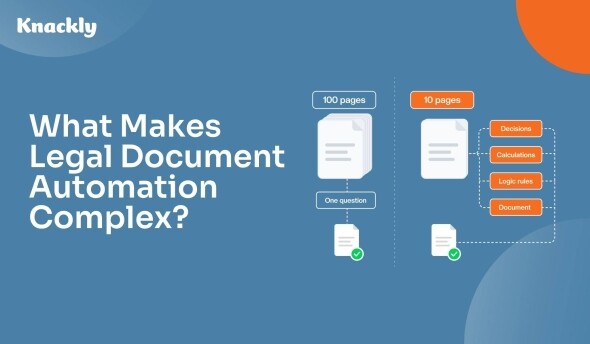
When people think about complex legal documents, they often think about length.
A 100-page trust must be more complicated to automate than a 10-page agreement, right?
Not necessarily.
The complexity of legal document automation isn’t determined by page count. It’s determined by the decisions, relationships, calculations, and drafting rules behind the document.
A 100-page document with relatively static language may be straightforward to automate. Meanwhile, a 10-page document with dozens of interconnected drafting decisions can require a sophisticated automation system.

Most Firms Choose the Wrong Automation Platform — Here’s Why
The problem isn’t features or price. It’s a misunderstanding of how automation tools break once documents get real.
Understanding that distinction is important when evaluating document automation technology—especially for law firms that want to automate more than simple forms and templates.
Here are some of the things that make legal document automation complex.
1. Conditional Drafting

One of the biggest differences between basic document generation and sophisticated document automation is conditional drafting.
Consider an estate planning document. The language that belongs in the final document might depend on questions such as:
- Is the client married?
- Does the client have children?
- Are any beneficiaries minors?
- Are there beneficiaries with special circumstances?
- Should distributions be made outright or held in trust?
- Who should serve as trustee?
- Who should serve if the first trustee cannot serve?
Each answer can affect provisions elsewhere in the document.
Basic automation might ask the user which paragraphs or clauses they want included. But that requires the user to understand the structure of the underlying document.
More sophisticated automation captures the facts of the matter and applies the firm’s drafting rules behind the scenes.
Instead of asking:
“Should Article 7.3 be included?”
the system can ask a question the attorney or client can actually answer and then determine whether Article 7.3 belongs in the document.
That distinction is important.
Good legal document automation doesn’t just automate typing. It automates drafting decisions.
2. Repeating Information
Legal matters rarely involve a fixed number of people, properties, assets, or transactions.
A matter might involve multiple:
- Beneficiaries
- Children
- Trustees
- Personal representatives
- Members
- Shareholders
- Properties
- Assets
- Loans
- Parties
Trying to automate these using fields such as Beneficiary1, Beneficiary2, Beneficiary3, and Beneficiary4 quickly becomes difficult to maintain—and eventually you run out of fields.
Complex document automation treats this information as structured data.
For example, instead of creating fields for five possible beneficiaries, Knackly can collect a list of beneficiaries.
That list can contain one beneficiary or fifty.
The automation can then use that information wherever it is needed: generating provisions, creating schedules, calculating distributions, determining pronouns, or producing entirely different documents.
3. Nested Data and Real-World Relationships
Sometimes even a list isn’t enough.
Legal information frequently contains relationships within relationships.
Imagine a trust with several beneficiaries.
Each beneficiary may have:
- Multiple children
- Different distribution percentages
- Different distribution ages
- Different successor beneficiaries
- Different trustees
- Different instructions if the beneficiary dies
Now imagine trying to represent all of that with hundreds of independent fields.
It becomes difficult for the person completing the interview, difficult for the automation developer, and difficult to maintain when the documents change.
Knackly uses an object-based data model that allows automation to represent these relationships more naturally.
A beneficiary can be a person. That person can have children. Those children can themselves have information and relationships associated with them.
Instead of flattening a legal matter into hundreds of disconnected variables, the automation can model the people, organizations, assets, and relationships that actually exist.
This becomes increasingly important as document automation grows in sophistication.
4. Calculations and Formulas
Sometimes the language in a document isn’t determined directly by an answer.
It has to be calculated.
Legal document automation may need to calculate:
- Distribution percentages
- Ownership interests
- Ages
- Deadlines
- Dates
- Financial values
- Allocation amounts
- Loan values
- Payment schedules
- Other values used in drafting decisions
Calculations can also influence conditional logic.
For example, a system might calculate someone’s age on a particular date and use the result to determine whether assets should be distributed outright or remain in trust.
At that point, the automation isn’t simply transferring information from an interview into a Word document.
It’s using information to make decisions that affect the document.
5. Multiple Related Documents
Legal work rarely produces a single document.
One matter might generate:
- A primary agreement
- Exhibits
- Schedules
- Notices
- Certificates
- Affidavits
- Authorizations
- Letters
- Supporting forms
And those documents often share information and drafting decisions.
Treating every document as an independent template creates unnecessary duplication. The same client, matter, property, or transaction information may have to be collected repeatedly or mapped separately into every document.
Knackly Apps allow related documents to operate as part of a single automated workflow.
Information can be collected once and used throughout the document set.
Logic can also determine which documents should be produced.
Instead of asking the user to assemble a document package manually, the automation can determine the appropriate documents based on the information collected during the interview.
Complexity Comes From the Rules Behind the Document
This is why page count is a poor way to measure document automation complexity.
The better questions are:
How many decisions are involved?
How interconnected are those decisions?
How complicated is the underlying data?
How many calculations are required?
How many documents depend on the same information?
A long document with limited variation may be easy to automate.
A short document containing nested data, calculations, repeating parties, and interconnected drafting rules may be significantly harder.
The goal of sophisticated legal document automation is to capture those rules and relationships so attorneys don’t have to reconstruct them every time they draft.
From Document Templates to Drafting Systems
There’s an important progression in document automation.
At the simplest level, automation fills information into a template.
At the next level, it conditionally assembles clauses.
But sophisticated legal document automation goes further.
It captures the knowledge behind how the documents are drafted.
That’s where automation becomes particularly powerful.
Instead of simply generating documents faster, firms can build systems that consistently apply their drafting methodology across matters, attorneys, and document sets.
Knackly is designed for exactly this kind of complex legal document automation—giving firms the ability to model sophisticated data, drafting logic, calculations, and multi-document workflows without forcing their legal work into a simplistic template system.

Kim is the CEO and Co-Founder of Knackly, a powerful tool that makes it easier than ever to automate critical processes in your business.
Grow your practice through efficiency and accuracy
Spend the time you save proactively helping your clients and winning new business.
Ready to automate your documentation?
This guide is designed to help you discover:
"*" indicates required fields

Continue reading

Want helpful occasional tips on document automation?
"*" indicates required fields